I was running fine, happy, content with RC1. Until, for no apparent reason, I ended up with a new BSOD: bad pool header
I let the physical image dump take place and then started the reboot process. But alas, I was presented with some pretty interesting error messages.
First things first: the BSOD. Here's the google search: LINK
Not the end of the world... but the crap storm after the reboot was... um... interesting. I was not able to WRITE to any partitions or drives on my computer. This includes USB external and being able to burn a CD/DVD. Yeah - when I tried to access the CD/DVD to burn an ISO image, I was informed, via dialog box, that I would need to contact the "system administrator" as this functionality is not available.
My dilemma was getting my saved files to a USB drive in order to wipe the laptop drive... if I had to go that far. See, I formatted two partitions on the laptop drive as exFAT... which meant that my dumb butt made 1/2 a 160 GB drive unavailable to other OSes. Bummer. Prior to remembering the exFAT piece, I went after some Ubuntu bits...
After installing Ubuntu 9.1 Alpha 2 64b on the laptop and then remembering the exFAT issue, I am back to W7RC1.
I'm glad I didn't put anything down on the W7 upgrade early edition....
Showing posts with label windows 7. Show all posts
Showing posts with label windows 7. Show all posts
Wednesday, July 8, 2009

Monday, June 15, 2009
Windows 7 Debacle
I have been pushing through the issues I have had recently with Windows 7 ... nothing major, just pains.
Four days ago, Windows 7 decides to just start randomly locking up... no mention in the Event Log, no errors on the screen, no "Windows did not shutdown correctly..." after a hard shutdown. And occasionally, USB Plug-n-Play would just stop working leaving me with media on an external drive but unable to load any of it. So much for the usage of Windows Media Center.
Now, I know this is an RC so I am not complaining as much as commenting.
We'll try re-image number 3 today to see how long I can go again...
Four days ago, Windows 7 decides to just start randomly locking up... no mention in the Event Log, no errors on the screen, no "Windows did not shutdown correctly..." after a hard shutdown. And occasionally, USB Plug-n-Play would just stop working leaving me with media on an external drive but unable to load any of it. So much for the usage of Windows Media Center.
Now, I know this is an RC so I am not complaining as much as commenting.
We'll try re-image number 3 today to see how long I can go again...
Friday, June 5, 2009
Windows 7 - Day (whatever)
I had to reimage...
Three things that killed it for me:
a) the Windows key just... didn't... work. Nothing. Nada. Zip. WTF?
b) the key would start RANDOM applications. Random. Like one time it started Windows Media Center. Then it was Chrome. Then note-freakin-pad.
And the best for last:
Everytime I would start up a Linux virtual guest through the "Virtual Machines" application (OpenSolaris, Ubuntu, Suse, Centos), my host (Windows 7) would either: blue screen or freeze all other applications.
I think this is starting over however I'm not counting the days any longer. If I fall into any of the issues above again, back to Linux I go...
Wednesday, May 27, 2009
Windows 7 - Day 23
Day 23 of my experience with Windows 7...
Quick observations:
- Search functionality is really working out well. I have been searching through on how to find all files in a directory. In an effort to figure out some complex searches, I found this article on the Advanced Query Syntax (AQS) from Microsoft: http://msdn.microsoft.com/en-us/library/aa965711.aspx
Now, I realize this dates back to Windows Search 2 or 3, so the functionality exists within Windows Desktop Search(es) and Vista. However, other issues on Vista and being an avid Linux user, the advanced syntax commands didn't really interest me. Now that I am on my 4th week of Win7, getting deeper into the framework, constructs, and designs of Windows desktop software interests me more.
My use case around this is determining a decent way to find non-music files in a directory to clear out old JPG, M3U, etc., files to keep the data clean. By following the instructions on the webpage, I came up with this search in Windows Explorer:
NOT *.mp3 kind:NOT folders
I'll have to be selective on the deletes (lucky for the Recycle Bin), but this at least separates the MP3 files from other file types as well as removes "folders" from the output.
More to come... back to house cleaning on my drives.
Friday, May 22, 2009
Windows 7 - Day (I think) 16
From my last post: http://sloppyganger.blogspot.com/2009/05/windows-7-day-4-er-day-5.html
Things are still going VERY well with W7. The PC froze once... but I was doing a ton of stuff...
- disk defrag
- Windows Defender checking
- Virtualization (on the disk I was defragging)
- and downloading some Android software
I have tried to replicate the same steps, scenario, and options... but it has not happened again.
As far as any new features, etc., I have not hit anything new. The snip tool (http://sloppyganger.blogspot.com/2009/05/windows-7-snip-tool-just-might-push-me.html) was really the last thing...
Monday, May 11, 2009
Windows 7 - Snip Tool just might push me over the EDGE
The snipping tool (found in Vista and XP Tablet edition) is probably the one tool that might be the show-stoppa when it comes to Windows usage. If this sucker was in XP Pro, I would have more interest in staying with that OS.
Keep in mind, I use the OneNote screen-clip function a TON. But the basic ability to launch this quick little tool and save JPEGs - natively, quickly, built-in - is fantastical!


Keep in mind, I use the OneNote screen-clip function a TON. But the basic ability to launch this quick little tool and save JPEGs - natively, quickly, built-in - is fantastical!
I thoroughly enjoy this little sucka!
Windows 7 - Day 4. Er, Day 5
Mother's Day was yesterday and I promised myself between doting over my wife and the all day marathon of House, MD., on USA, I was not going to spend time on the computer. So, no day 4.
Onward and upward... Day 5...
Interesting little tidbit with Gmail and IE8. If I change the theme (from anything to anything), then the Inbox works just fine. Otherwise, my stuff's broke and I default back over to FF. Here are some screen shots of my ordeal.
First:

Just straight up annoying... and non-functioning. Here is a snip of the bottom Inbox section:

After I change the theme (from Settings-> Themes) from the Gmail UI:

But this ONLY works during my session. Once I restart IE8, my issue returns:
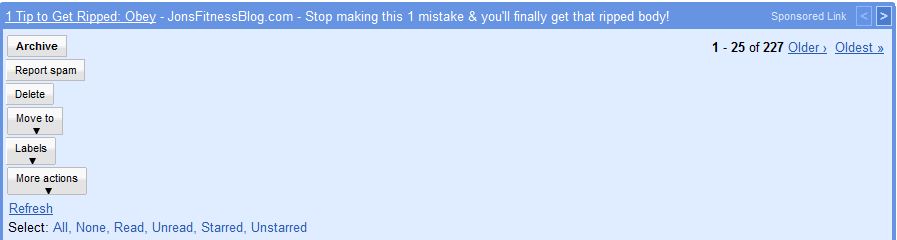
It doesn't matter which theme I use and only happens in IE8. Also, this only appears to happen in the IE8 on Windows 7 as my XP IE8 installation is not behaving in this manner. A big difference in the two OSes is W7 is x86_64 and WinXP is x86.
I am not sure that blame belongs with Windows 7, yet. It could certainly be contained within:
I haven't gone through to turn on/off new features and functionality within Gmail - I like to turn on the toys. But that seems hardly the solution - turn off the new features and enhancements that make the software more useful (IMO) so that the solution actually works as intended... since this behavior is limited to IE8 on W7 and no other browser - I also confirmed Google Chrome is happy - I am not going to go through the trouble of attempting to determine root cause. I simply don't care if this site doesn't work in IE8 on x86_64 W7. <<>>
Heck, I use FF w/ IE Tab more than anything else anyway...
Looking forward to Day 6...

Onward and upward... Day 5...
Interesting little tidbit with Gmail and IE8. If I change the theme (from anything to anything), then the Inbox works just fine. Otherwise, my stuff's broke and I default back over to FF. Here are some screen shots of my ordeal.
First:
Just straight up annoying... and non-functioning. Here is a snip of the bottom Inbox section:
After I change the theme (from Settings-> Themes) from the Gmail UI:
But this ONLY works during my session. Once I restart IE8, my issue returns:
It doesn't matter which theme I use and only happens in IE8. Also, this only appears to happen in the IE8 on Windows 7 as my XP IE8 installation is not behaving in this manner. A big difference in the two OSes is W7 is x86_64 and WinXP is x86.
I am not sure that blame belongs with Windows 7, yet. It could certainly be contained within:
- how Gmail is presenting information to the IE8 code base on Windows 7 x86_64
- IE8's rendering in the x86_64 build
- an RC issue within Windows 7 that doesn't handle certain AJAX/Web 2.0/new fangled widget
I haven't gone through to turn on/off new features and functionality within Gmail - I like to turn on the toys. But that seems hardly the solution - turn off the new features and enhancements that make the software more useful (IMO) so that the solution actually works as intended... since this behavior is limited to IE8 on W7 and no other browser - I also confirmed Google Chrome is happy - I am not going to go through the trouble of attempting to determine root cause. I simply don't care if this site doesn't work in IE8 on x86_64 W7. <<>>
Heck, I use FF w/ IE Tab more than anything else anyway...
Looking forward to Day 6...
Saturday, May 9, 2009
Windows 7 - Day 3
I may have finally found the "break" in this OS... but I will need to check in IE 8 on my XP box first.
The issue is Gmail. The drop down menus are rendered in the wrong spots and my email is not updating in IE 8. I have downloaded Chrome and Firefox to see if the issue persists. Also, dslreports.com speed tests show my upload speed @ an amazing, blazing 43Mbps.

I don't think this is possible from a (my) consumer cable line.. but you never know. Maybe Comcast is being more giving these days.
More tests to follow.

The issue is Gmail. The drop down menus are rendered in the wrong spots and my email is not updating in IE 8. I have downloaded Chrome and Firefox to see if the issue persists. Also, dslreports.com speed tests show my upload speed @ an amazing, blazing 43Mbps.
I don't think this is possible from a (my) consumer cable line.. but you never know. Maybe Comcast is being more giving these days.
More tests to follow.
Friday, May 8, 2009
Windows 7 - Day 2
So far, so good.
Pinned Applications
Ok - the pinned application section in the task bar... is... freakin'... cool!
Not only is it at the window level, but for Internet Explorer, the tabs are displayed individually.
Search Apps
And one thing that my boy Donn brought up starting back in Vista was the "Start and Type" search functionality. I use Launchy in my XP machines for the same features/functions. In Windows 7, the search results are expanded. The term "virtual" gives me options from Internet Explorer, the Virtualbox application, and the Virtual machines within Windows 7 - such as the "free" Windows XP machine.
Wallpapers
The extra wallpapers are really nice.
Themes
It's about time more (free) themes are readily available for Windows 7 directly from MS.
I'll keep trying... but I will keep seeking the fault. It ain't wrong.
Pinned Applications
Ok - the pinned application section in the task bar... is... freakin'... cool!
Not only is it at the window level, but for Internet Explorer, the tabs are displayed individually.
Search Apps
And one thing that my boy Donn brought up starting back in Vista was the "Start and Type" search functionality. I use Launchy in my XP machines for the same features/functions. In Windows 7, the search results are expanded. The term "virtual" gives me options from Internet Explorer, the Virtualbox application, and the Virtual machines within Windows 7 - such as the "free" Windows XP machine.
Wallpapers
The extra wallpapers are really nice.
Themes
It's about time more (free) themes are readily available for Windows 7 directly from MS.
I'll keep trying... but I will keep seeking the fault. It ain't wrong.
Thursday, May 7, 2009
Windows 7 - Day 1
After downloading and burning the x64 edition of Windows 7, I believe, more and more, that the UI is influenced - if not derived - from KDE.
Thus far, I am really enjoying the task bar pinned applications.
Tomorrow, I am going to get the Live adapter setup to share my media - specifically my music.
A daily touchpoint may be in order...
Thus far, I am really enjoying the task bar pinned applications.
Tomorrow, I am going to get the Live adapter setup to share my media - specifically my music.
A daily touchpoint may be in order...
Subscribe to:
Posts (Atom)

 Posts
Posts

