I have been using Windows 7, off and on, since the download was made available earlier this month. The new bells and features seem to make the operating system show some new prowess. However, any of the issues I had before with Vista drivers, I am now having issues in Windows 7.
Amazingly, my cell phone actually charges when plugged into Windows XP SP2 after installing the Sprint software. (The same cell phone has always worked just fine on any Linux distribution)
So:
Windows XP - works after install
Vista - not so much.
Windows 7 - even worse.
I will say that the attempts to update Notepad and Paint are, well, ok. Some of the features are actually pretty nice. The docking taskbar, with links for Internet Explorer, WMP, and Windows Explorer, is a nice improvement. Also, User Account Control (UAC) is less intrusive and objectionable (to me, at least).
The upside -
All of my laptop drivers were detected and installed without an issue. (This is another wonderful piece of Linux, :). Also, the new KDE feel of the default UI is pleasing to me. I wonder if Gnome-like desktop is an option...?
No plans to reimage the laptop for now...
Saturday, January 31, 2009

Tuesday, October 21, 2008
Adding a second monitor
My tech-savvy sis sent me a picture the other day of a computer where she wants to add a second monitor. Being 1,600 miles away, this requires some asynchronous communication and a bit of thought to make sure the proper advise is out there. So, I decide to post here and send her the link.
Firstly, the PC:

Alright, so this 'puter has only one video connection. A presumable AGP VGA card.
To add a second (or more) monitor, you would have to:
Comment back on any other options out there to extend monitor quantity.
Firstly, the PC:

Alright, so this 'puter has only one video connection. A presumable AGP VGA card.
To add a second (or more) monitor, you would have to:
- Add a second card to one of the PCI slots.
- Good ratings, for the most part, for this guy: http://www.newegg.com/Product/Product.aspx?Item=N82E16814133233
- You could actually run three monitors if you had this card with the dual VGA connectors
- Replace the card you have with a new dual-head video card. There are some considerations here:
- Is you current card card PCI-X (don't confuse this with regular PCI) or AGP
- Does the video card require a separate power connection inside the case. Some video cards require more power than just the slot and use the same power connector - usually - as a hard drive (the white 4-pin MOLEX). Can your power supply take care of the extra load?
- Does the video card monitor connectors match the current monitor cable?
- There are two types of video connectors for PCS - VGA and DVI
- A decent card with DVI connectors will have at least one adapter
- DVI is digital and a better signal, but your monitor must support the digital signal (sort of like having HD cable. If you do not have an HD TV, what's the point?)
- VGA is the analog equivalent and supported by 99% of the monitors out there made after 2000.
- USB to VGA adapter
- http://sewelldirect.com/usb2tosvga.asp?adpath=/Google/Other%20Products/USB%20to%20SVGA%20Adapter&keywords=usb%202.0%20vga%20adapter&match=2&search=search&gclid=CObVqaGzuZYCFRJdxwodQkUBLg
- http://www.iogear.com/product/GUC2015V/
- Or go nuckin' futs: http://www.engadget.com/2008/08/25/iogears-wireless-usb-to-vga-kit-extends-your-monitor-sans-wires/
- I have not looked into this option much but you may find something out there that you willing to try.
Comment back on any other options out there to extend monitor quantity.
Friday, October 3, 2008
DD-WRT
With the fairly (no pun intended AT ALL) recent details about Comcast's latest endeavor to tighten the screws a little more against the consumers, I was curious about monitors or meters for those consumers to view the amount of usage.
There have been two lines of thought...and I can't confirm, completely, either but either:
Now, I have a couple of PCs running at the same time and do not want to get into a distributed solution. I need something as a hub for all of my PCs to consolidate to from a usage perspective.
Two options came to mind for me:
But the really cool thing was... DD-WRT.
Here it the link to the main site:
Link
Hardware compatibility list:
Link
Lifehacker.com has a great write up on the install here:
Link
Example graphing for usage:

Luckily, I have the Linksys WRT-54 so I was good to go.
Now, I am able to track my usage - at least to the point that I trust the DD-WRT tools as opposed to the monitoring tools provided by the same provider as the consumable good...can you smell the conflict with that latter statement?
Enjoy
There have been two lines of thought...and I can't confirm, completely, either but either:
- Comcast will shut you down after 250GB/month for total bandwidth consumption
- Or, you will be penalized for overages
Now, I have a couple of PCs running at the same time and do not want to get into a distributed solution. I need something as a hub for all of my PCs to consolidate to from a usage perspective.
Two options came to mind for me:
- Set up a Linux box to use as a concentrator, if you will, for all of the network connections and sit between my wireless router (for the lappy worqs) and the cable modem
- Or, figure out a solution on the router itself
But the really cool thing was... DD-WRT.
Here it the link to the main site:
Link
Hardware compatibility list:
Link
Lifehacker.com has a great write up on the install here:
Link
Example graphing for usage:

Luckily, I have the Linksys WRT-54 so I was good to go.
Now, I am able to track my usage - at least to the point that I trust the DD-WRT tools as opposed to the monitoring tools provided by the same provider as the consumable good...can you smell the conflict with that latter statement?
Enjoy
Wednesday, September 24, 2008
Mapping Management Consoles to Descriptions
As I was going through looking for a specific MSC file (Microsoft Manament Console Snap-In), I was having a rough time discerning one file from another and what the MSC snap-in actually was used for.
For example, Active Directory Users and Computers is named dsa.msc (well, of course). There would be too much confusion to call it something descriptive and intuitive
- like ADUsersAndComputers.msc.
I mean, NTFS can't handle larger than 8.3 file names, can ... it... I digress.
I Googled for a few minutes to find a listing of the various MSC snap-ins and found this list.
Link
Not sure how dated it is or what is missing or how accurate the listing may be. However, for my immediate need, it worked out quite well.
For example, Active Directory Users and Computers is named dsa.msc (well, of course). There would be too much confusion to call it something descriptive and intuitive
- like ADUsersAndComputers.msc.
I mean, NTFS can't handle larger than 8.3 file names, can ... it... I digress.
I Googled for a few minutes to find a listing of the various MSC snap-ins and found this list.
Link
Not sure how dated it is or what is missing or how accurate the listing may be. However, for my immediate need, it worked out quite well.
Saturday, September 20, 2008
Adjusting Vista's System Restore Disk Space
My 80 GB hard disk was getting low on free space...about 20% left. From a fragmentation perspective, you need +15% to run a defrag correctly. I needed to clear up some space...but how and from where?
So, in order to clear up some space, I:
After realizing that System Restore on my Vista x86_64 lappy was using approx. 15% of my 80 GB hard disk, I decided this was an area I could investigate and make some adjustments.
Oh - wait. In Windows XP, the System Restore settings are somewhat trivial to find and adjust.
Right click on 'My Computer' and choose the 'System Restore' tab

On this tab, you can turn System Restore on or off and adjust the total size used. Depending on your application, adjusting these settings can be good...but potentially disastrous!

Make changes at your own risk!
Changes to System Restore and alter your PCs ability to provide to you the functionality of going back in time if something bad happens... Also, if you turn OFF System Restore, your old restore points go bu-bye. Now, I always turn off System Restore in my virtual machines and rely on snapshots to "go back".
Back to Vista...
I right click on "My Computer" and select 'Advanced system settings'. The applet windows that opens has a tab called 'System Protection'. I click on that tab and...wait. Where's my slider bar? Oh, there's a 'System Restore' button. Let's check that out. No...that just let's me select a restore point to go to or to create a new restore point.


Hmmm... Seems like some changes have taken place.
I poked around a bit on the InterTubes and discovered the System Restore policies are shadowstorage. An elevated command prompt and some commands are going to be required to adjust the System Restore settings.
I fired up a command prompt with Administrator privileges by typing "cmd" in the Run dialog.

I then


So, in order to clear up some space, I:
- cleared the Recycle Bin
- scanned for junk files using the Disk Cleanup within Windows
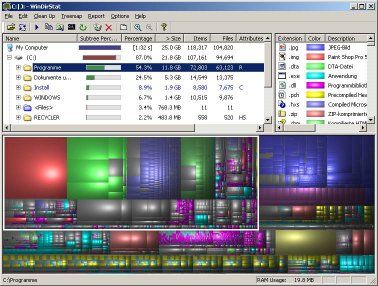
- scanned using WinDirStat (link)(screenshot) for any other large files that I might be able to get rid of
- checked my pagefile.sys (virtual memory) to make sure Windows was locked into a specific size and/or not trying to create to large of a file. Note: I have 4GB of RAM, so the usage of a pagefile is probably not too extensive.
- looked into System Restore settings to see how much disk space is being used
After realizing that System Restore on my Vista x86_64 lappy was using approx. 15% of my 80 GB hard disk, I decided this was an area I could investigate and make some adjustments.
Oh - wait. In Windows XP, the System Restore settings are somewhat trivial to find and adjust.
Right click on 'My Computer' and choose the 'System Restore' tab

On this tab, you can turn System Restore on or off and adjust the total size used. Depending on your application, adjusting these settings can be good...but potentially disastrous!

Make changes at your own risk!
Changes to System Restore and alter your PCs ability to provide to you the functionality of going back in time if something bad happens... Also, if you turn OFF System Restore, your old restore points go bu-bye. Now, I always turn off System Restore in my virtual machines and rely on snapshots to "go back".
Back to Vista...
I right click on "My Computer" and select 'Advanced system settings'. The applet windows that opens has a tab called 'System Protection'. I click on that tab and...wait. Where's my slider bar? Oh, there's a 'System Restore' button. Let's check that out. No...that just let's me select a restore point to go to or to create a new restore point.


Hmmm... Seems like some changes have taken place.
I poked around a bit on the InterTubes and discovered the System Restore policies are shadowstorage. An elevated command prompt and some commands are going to be required to adjust the System Restore settings.
I fired up a command prompt with Administrator privileges by typing "cmd" in the Run dialog.

- typed 'vssadmin list' to display the available options

- typed 'vssadmin list shadowstorage' to see how much space was allocated and how much was in use.

- I decided to cut 60% of this down - going from 14.1 GB to 5GB for System Restore. I am not using any particular calculation for this... More of a SWAG.
- typed 'vssadmin resize shadowstorage' to get the syntax for the command

- typed 'vssadmin resize shadowstorage /for=c: /on=c: /MaxSize=5GB' to trim down the System Restore size
- The vssadmin command returns successful
- ran the 'vssadmin list shadowstorage' command again to validate the setting

Friday, September 19, 2008
Active Hard Disk Monitor
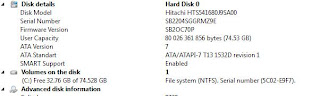
Active Hard Disk Monitor (http://www.ntfs.com/disk-monitor.htm) allows you access to view your hard drive information, scan for issues, and provides in-depth information about the health of the device.
Some screen shots:



Test Results

Drive Information
Some screen shots:
About window

Various Tabs

Drive Gauge

Basic Icons

Test Results

Drive Information

The "scan disk" feature reads disk block information to analyze good/bad blocks. While the tools doesn't appear to have proactive monitoring capabilities in the freeware version, the monitoring available does provide a reactive tool that would provide some details as to what is going on "under the hood".
Sunday, September 7, 2008
Personal Responsibility
A great post to read, ponder, absorb, and finally act on:
http://www.schaefersblog.com/what-ever-happened-to-personal-responsibility-a-rant/
http://www.schaefersblog.com/
Subscribe to:
Posts (Atom)

 Posts
Posts